5G PDU Session Establishment Procedure Call Flow
5G PDU Session Establishment is the session-management procedure that creates the data path the UE will use to reach a data network or service domain.
It combines NAS session setup, policy and QoS application, and user-plane creation into one end-to-end workflow.
Introduction
This is the core 5G data-session setup procedure. The practical goal is not just to get a clean Accept, but to prove that the new session has the right DNN, slice, QoS treatment, and working user-plane path.
In live traces, the most useful checkpoints are the request contents, the SMF and UPF session creation logic, the returned Accept, and the first real packets sent on the new session.
What Is PDU Session Establishment in Simple Terms?
- What starts the procedure: The UE needs a new data session toward a specific service or DNN.
- What the UE and network want to achieve: Create a usable PDU session with correct addressing, QoS, and forwarding behavior.
- What success looks like: The UE receives PDU Session Establishment Accept and real traffic flows.
- What failure means: The session is rejected, mis-profiled, or accepted without working data transport.
Why this procedure matters
PDU Session Establishment is where 5G user-plane service actually begins. If this procedure is misread, later application, VoNR, QoS, and slice problems get blamed on the wrong layer.
Quick Fact Sheet
| Procedure name | 5G PDU Session Establishment Procedure |
|---|---|
| Domain | 5G NR + 5GC data-session setup |
| Main trigger | UE needs a new session toward a DNN or service slice |
| Start state | UE is registered in 5GS but does not yet have the requested session |
| End state | A new PDU session is active with QoS and user-plane context |
| Main nodes | UE, gNB, AMF, SMF, UPF |
| Main protocols | NAS, NGAP, PFCP, QoS and policy handling |
| Main success outcome | PDU Session Establishment Accept arrives and real traffic flows on the new session |
| Main failure outcome | The session is rejected, mis-profiled, or accepted without usable traffic |
| Most important messages | PDU Session Establishment Request, PDU Session Establishment Accept, PDU Session Establishment Reject |
| Main specs | TS 23.502, TS 24.501, TS 23.501, TS 29.244 |
Preconditions
- The UE is already registered in 5GS.
- The requested DNN and slice are allowed for the subscriber.
- AMF, SMF, and UPF can coordinate session creation successfully.
- The access side can carry both the session signaling and later user-plane traffic.
Nodes and Interfaces
Nodes involved
| Node | Role in this procedure |
|---|---|
| UE | Requests the session and applies the returned address and QoS context. |
| gNB | Relays NAS signaling and activates access-side handling for the session. |
| AMF | Anchors N1 signaling and forwards the session exchange toward the SMF. |
| SMF | Creates the session, selects the UPF, and installs policy and QoS behavior. |
| UPF | Provides the user-plane anchor and forwarding treatment for the session. |
Interfaces used
| Interface | Path | Role |
|---|---|---|
| NR-Uu | UE <-> gNB | Carries session signaling and later user-plane traffic. |
| N1 | UE <-> AMF | Carries PDU Session Establishment Request and the final result. |
| N2 | gNB <-> AMF | Relays access-side context for the session setup. |
| N11 | AMF <-> SMF | Builds the session state and NAS response. |
| N4 / N3 | SMF <-> UPF and gNB <-> UPF | Install and use the new user-plane path. |
End-to-End Call Flow
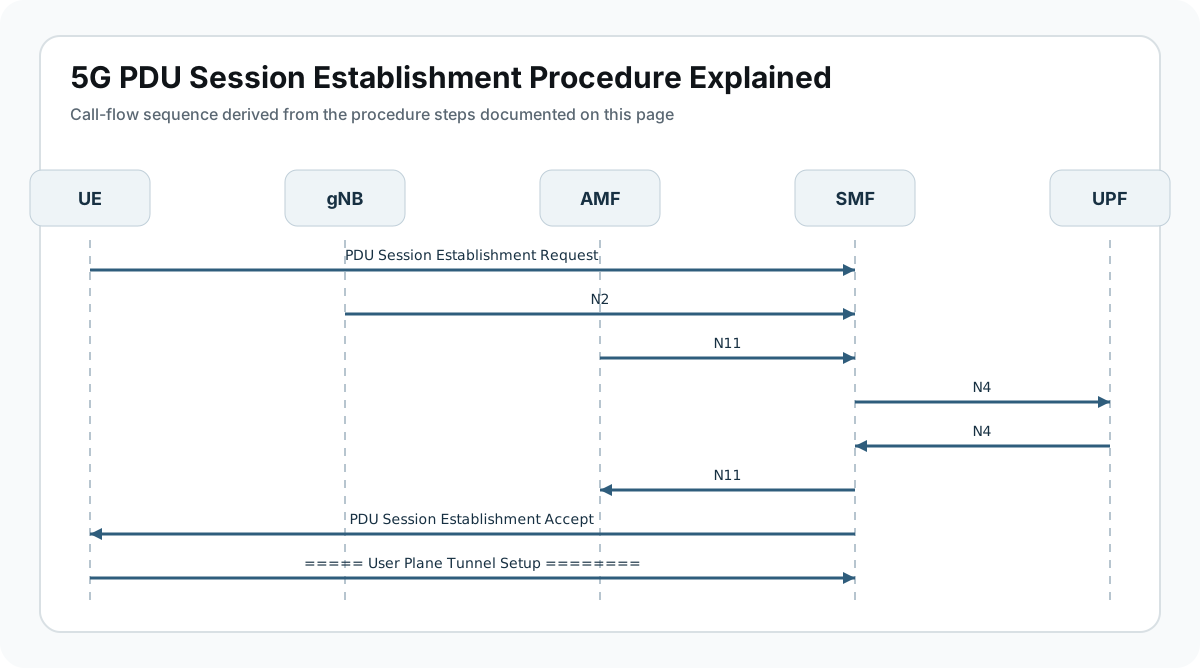
UE                gNB                AMF                SMF                UPF
|                  |                  |                  |                  |
|-- Establishment Request ----------->|----------------->|----------------->|
|                  |                  |                  |-- PFCP setup --->|
|                  |                  |                  |<-- rules ready ---|
|<-- Establishment Accept ------------|<-----------------|<-----------------|
|==== user-plane traffic over new session ================================>|
Major Phases
| Phase | What happens |
|---|---|
| 1. Session need appears | The UE or service logic decides that new data connectivity is needed. |
| 2. Session request | The UE sends PDU Session Establishment Request with DNN, slice, and session type. |
| 3. Session creation | The SMF validates the request, selects the UPF, and installs forwarding rules. |
| 4. Accept or reject | The network returns PDU Session Establishment Accept or a reject. |
| 5. User-plane activation | The new session becomes functionally usable for real traffic. |
Step-by-Step Breakdown
UE sends a new session request
Sender -> receiver: UE -> gNB -> AMF -> SMF
Message(s): PDU Session Establishment Request
Purpose: Start creation of a data session toward the requested DNN or service environment.
State or context change: The network begins building session state for a new PDU Session ID.
Note: Check DNN, S-NSSAI, session type, and SSC mode before analyzing the rest of the flow.
SMF validates the request and selects user-plane resources
Sender -> receiver: AMF <-> SMF <-> UPF
Message(s): Session context handling and PFCP rule installation
Purpose: Create the session anchor and forwarding behavior for the new data path.
State or context change: The session moves from request state into an anchored core-network design.
Note: Wrong DNN, slice, or policy selection here often causes later service issues even if Accept is returned.
QoS and policy treatment are assigned
Sender -> receiver: SMF and policy functions
Message(s): QoS rules, AMBR, and session parameters
Purpose: Define how the new session should behave under load and by service type.
State or context change: The session becomes aligned to subscription and policy expectations.
Note: A clean setup with weak QoS still becomes a real field issue after service starts.
The network returns PDU Session Establishment Accept
Sender -> receiver: SMF -> AMF -> gNB -> UE
Message(s): PDU Session Establishment Accept
Purpose: Provide the UE with the final address, QoS, and session identity.
State or context change: The UE can activate the session locally.
Note: Read the accept for the assigned address, session AMBR, and QoS rules before moving into traffic analysis.
Real traffic uses the new session
Sender -> receiver: UE <-> gNB <-> UPF <-> data network
Message(s): First user-plane packets on the new session
Purpose: Prove the session is functionally usable rather than only logically created.
State or context change: The session becomes a real transport path for applications.
Note: Traffic is the end proof. Accept without usable data is only partial success.
Important Messages in This Flow
| Message | Protocol | Direction | Purpose in this procedure | What to inspect briefly |
|---|---|---|---|---|
| PDU Session Establishment Request | NAS | UE -> SMF via AMF | Starts session creation. | Inspect DNN, S-NSSAI, PDU session type, and requested capabilities. |
| PDU Session Establishment Accept | NAS | SMF -> UE via AMF | Confirms session creation and returns usable parameters. | Check IP address, QoS rules, session ID, and AMBR. |
| PDU Session Establishment Reject | NAS | SMF -> UE via AMF | Shows the requested session could not be created. | Use the reject cause to separate subscription, slice, DNN, and resource failures. |
| PFCP rule installation | PFCP | SMF <-> UPF | Creates the forwarding treatment used by the new session. | Check whether UPF rules match the intended DNN and service. |
Important Parameters to Inspect
| Parameter | What it is | Where it appears | Why it matters | Common issues |
|---|---|---|---|---|
| DNN | Data network name the UE wants to reach. | Request and Accept | Defines the target service domain for the session. | Wrong DNN can create the wrong session cleanly. |
| S-NSSAI | Slice context for the requested session. | Request and policy selection | Explains slice-specific routing and policy behavior. | Unexpected slice leads to reject or wrong policy. |
| PDU Session Type | IPv4, IPv6, IPv4v6, or Ethernet behavior. | Request and Accept | Controls addressing and later application compatibility. | Type mismatch breaks service after setup. |
| QoS rules and AMBR | Traffic treatment assigned to the session. | Accept and policy state | Critical for how usable the session is under load. | Weak or mismatched QoS becomes a later service problem. |
| PDU Session ID | Identifier for the created session. | Request, Accept, later modification flows | Lets you correlate setup, changes, and release behavior. | Wrong session correlation hides the real issue. |
Success Criteria
- The request is accepted with the expected DNN, slice, and session type.
- The SMF and UPF install the required session and forwarding context.
- The UE applies the returned address and QoS information correctly.
- Real traffic flows over the new session after acceptance.
Common Failures and Troubleshooting
| Symptom | Likely cause | Where to inspect | Relevant message(s) | Relevant interface(s) | Likely next step |
|---|---|---|---|---|---|
| Session request is rejected | Subscription, DNN, slice, or policy conditions do not allow the session. | Request contents and reject cause. | Establishment Request, Reject | N1, N11 | Use the reject cause before blaming radio or RAN state. |
| Accept arrives but traffic does not flow | The N3 or UPF path was not fully activated. | Accept contents, PFCP state, and first data packets. | Establishment Accept | N3, N4 | Treat it as post-accept transport failure, not only a NAS issue. |
| Wrong session profile is built | The request or policy resolved to an unintended DNN, slice, or service profile. | DNN, slice, address, and session parameters in the Accept. | Request, Accept | N1, N11 | This is a correctness issue rather than a transport outage. |
| Session is healthy but application still fails | The session exists, but QoS, routing, or higher-layer prerequisites are still wrong. | QoS rules, address assignment, and first application packets. | Accept and early traffic | N3, service layer | Correlate transport success with the first real service flow. |
What to Check in Logs and Traces
- Start with DNN, S-NSSAI, and PDU session type in the request.
- Inspect the Accept for address assignment, QoS rules, and session AMBR.
- Correlate NAS success with PFCP and N3 activation before declaring the session healthy.
- Use the session ID to follow later modification, release, and application issues cleanly.
- Prove success with the first real user-plane packets, not only the NAS Accept message.
Related Pages
Related sub-procedures
- 5G PDU Session Modification
- 5G PDU Session Release
- 5G Secondary PDU Session Setup
- 5G QoS Flow Establishment
Related message reference pages
Related troubleshooting pages
Notes
PDU Session Establishment is only fully successful when traffic really flows. The best fast checks are request intent, accept contents, PFCP state, and the first user-plane packets.
FAQ
What is 5G PDU Session Establishment?
It is the session-management procedure that creates a new data session between the UE and a data network in 5GS.
How is it different from Service Request?
Service Request restores active use of existing context. PDU Session Establishment creates a new session.
What confirms success?
A valid PDU Session Establishment Accept followed by real user-plane traffic on the new session.
What should I inspect first?
Start with DNN, S-NSSAI, session type, and the returned QoS and addressing information.
Why can traffic fail after a good Accept?
Because the user-plane or policy treatment may still be wrong even when NAS signaling completed successfully.