5G Network Requested PDU Session Establishment Explained
Introduction
In 5G networks, a PDU Session is typically initiated by the User Equipment (UE) when an application requires connectivity to a data network.
However, there are scenarios where the network itself initiates the PDU session. This is known as Network Requested PDU Session Establishment.
This mechanism is useful for services such as:
- push notifications
- IoT device activation
- operator service triggers
- mobile terminated data sessions
The procedure is defined by the 3rd Generation Partnership Project in 3GPP TS 23.502.
Why Network Requested Sessions Are Needed
Normally, the UE initiates a session when it needs connectivity.
But sometimes the network must deliver data to the UE, even when the UE is idle.
Examples include:
- incoming application data
- push messages
- IoT device commands
- network-triggered services
To handle this scenario, the network triggers a Network Requested PDU Session Establishment.
Network Functions Involved
The procedure involves several 5G Core Network Functions.
UE (User Equipment)
The UE responds to paging and completes session establishment.
gNB
The gNB provides radio access and forwards signaling messages.
AMF (Access and Mobility Management Function)
The AMF handles mobility management and initiates paging.
SMF (Session Management Function)
The SMF triggers the PDU session establishment when the network needs to deliver data.
UPF (User Plane Function)
The UPF forwards user data packets between the UE and the data network.
Interfaces Used
| Interface | Description |
|---|---|
| NR-Uu | Radio interface between UE and gNB |
| N1 | NAS signaling between UE and AMF |
| N2 | Control signaling between gNB and AMF |
| N11 | Control signaling between AMF and SMF |
| N4 | Control signaling between SMF and UPF |
| N3 | User plane tunnel between gNB and UPF |
Network Requested PDU Session Call Flow
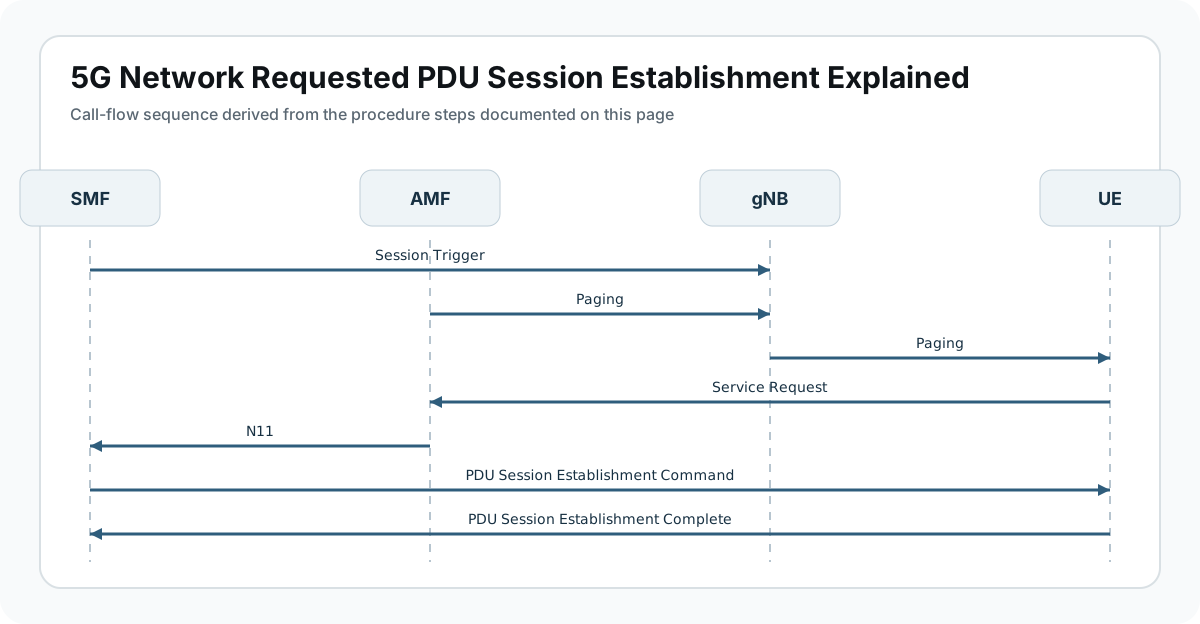
Below is the simplified signaling sequence.
SMF            AMF            gNB            UE
 |              |              |              |
 |--Session Trigger----------->|
 |              |--Paging----->|
 |              |              |----Paging-->|
 |              |              |              |
 |              |<--Service Request-----------|
 |              |              |              |
 |<--N11--------|              |              |
 |              |              |              |
 |---PDU Session Establishment Command------>|
 |              |              |              |
 |<--PDU Session Establishment Complete------|
This flow shows how the network wakes up the UE and triggers session establishment.
Step-by-Step Explanation
Step 1: Session Trigger in SMF
The SMF receives a trigger indicating that data must be delivered to the UE.
Possible triggers include:
- application server request
- network policy trigger
- incoming packet detection at UPF
The SMF then initiates the session establishment procedure.
Important parameters to check
Engineers should verify:
- SMF trigger source
- PDU session ID
- data network name (DNN)
Step 2: UE Paging
If the UE is in Idle Mode, the AMF initiates paging.
Paging is sent through the gNB to locate the UE.
Important parameters to check
Check:
- paging identity (5G-S-TMSI)
- tracking area list
- paging response timer
Step 3: Service Request from UE
Once paged, the UE responds with a Service Request.
This message establishes a signaling connection with the network.
Important parameters to check
Verify:
- service type
- UE identity
- security context
Step 4: PDU Session Establishment Command
The network sends PDU Session Establishment Command to the UE.
This message instructs the UE to establish a data session.
It contains:
- PDU session ID
- QoS parameters
- session configuration
Important parameters to check
Look for:
- QoS Flow Identifier (QFI)
- session AMBR
- IP address allocation
Step 5: Session Completion
The UE confirms the session setup by sending PDU Session Establishment Complete.
After this step:
- user plane tunnels are activated
- data can flow between the UE and the network.
Data Path After Session Setup
Once the procedure completes, the data path is established.
UE -> gNB -> UPF -> Data NetworkCommon Use Cases
| Scenario | Description |
|---|---|
| Push notifications | Mobile apps receiving messages |
| IoT devices | Remote device activation |
| Network services | Operator-triggered services |
| Mobile terminated data | Incoming packet delivery |
Troubleshooting Network Requested Sessions
UE Not Responding to Paging
Possible causes:
- UE out of coverage
- paging configuration error
- incorrect tracking area list
Session Establishment Fails
Possible reasons:
- SMF configuration issue
- incorrect subscription data
- slice restrictions
Data Not Delivered
Possible causes:
- UPF routing failure
- tunnel setup issue
- QoS mismatch
Key Messages
| Message | Purpose |
|---|---|
| Paging | Network locates UE |
| Service Request | UE establishes signaling |
| PDU Session Establishment Command | Network triggers session |
| PDU Session Establishment Complete | UE confirms setup |
Relevant 3GPP Specifications
The procedure is defined by the 3rd Generation Partnership Project in:
- 3GPP TS 23.502 - 5G System Procedures
- 3GPP TS 24.501 - NAS Protocol
Summary
The Network Requested PDU Session Establishment procedure allows the 5G network to initiate data sessions toward a UE when incoming data needs to be delivered.
The procedure includes:
- session trigger at the SMF
- UE paging by the AMF
- service request from the UE
- session establishment signaling
This mechanism ensures that mobile devices can receive network-triggered data even when idle.