5G QoS Flow Establishment Procedure Explained
Introduction
The QoS Flow Establishment procedure in 5G networks creates the QoS treatment needed for a specific service inside a PDU session.
In practical engineering terms, this is where the network decides which QoS Flow Identifier (QFI), 5QI, and enforcement rules should be used so that the application gets the expected latency, priority, and throughput behavior.
This page is most useful when read together with 5G PDU Session Establishment, 5G PDU Session Modification, and Network Requested PDU Session Establishment.
The main procedural references are:
- 3GPP TS 23.501 - System Architecture for the 5G System
- 3GPP TS 23.502 - 5G System Procedures
- 3GPP TS 24.501 - NAS Protocol
- 3GPP TS 38.300 - NR and NG-RAN Overall Description
What QoS Flow Establishment Does
A QoS flow is the 5G service-level construct that carries packets with a particular QoS treatment inside a PDU session.
| QoS concept | Why engineers care |
|---|---|
| QFI | Identifies the QoS flow within the PDU session. |
| 5QI | Represents the standardized QoS characteristics such as delay and packet error behavior. |
| GBR / non-GBR | Determines whether guaranteed resources are expected. |
| QoS rules | Map application traffic to the right QoS flow. |
| RAN resource mapping | Translates service-level QoS into radio behavior and bearer treatment. |
Network Functions Involved
| Network Function | Role in QoS flow establishment |
|---|---|
| UE | Receives QoS rules and uses them to map uplink traffic to the correct flow. |
| gNB | Applies radio-side resource treatment for the QoS flow. |
| AMF | Carries control-plane signaling between the access side and session-management side. |
| SMF | Creates the QoS flow context, QFI, and policy-driven rules. |
| UPF | Applies user-plane forwarding and enforcement behavior for the QoS flow. |
| PCF | May influence policy and charging decisions that affect the QoS profile. |
Interfaces Used
| Interface | Purpose |
|---|---|
| N1 | NAS signaling carrying session and QoS-related information to the UE. |
| N2 | RAN control signaling used for access-side setup. |
| N11 | AMF to SMF control path for session and QoS decisions. |
| N4 | SMF to UPF control path for enforcement rules and forwarding behavior. |
| N3 | User-plane path between gNB and UPF after the flow becomes active. |
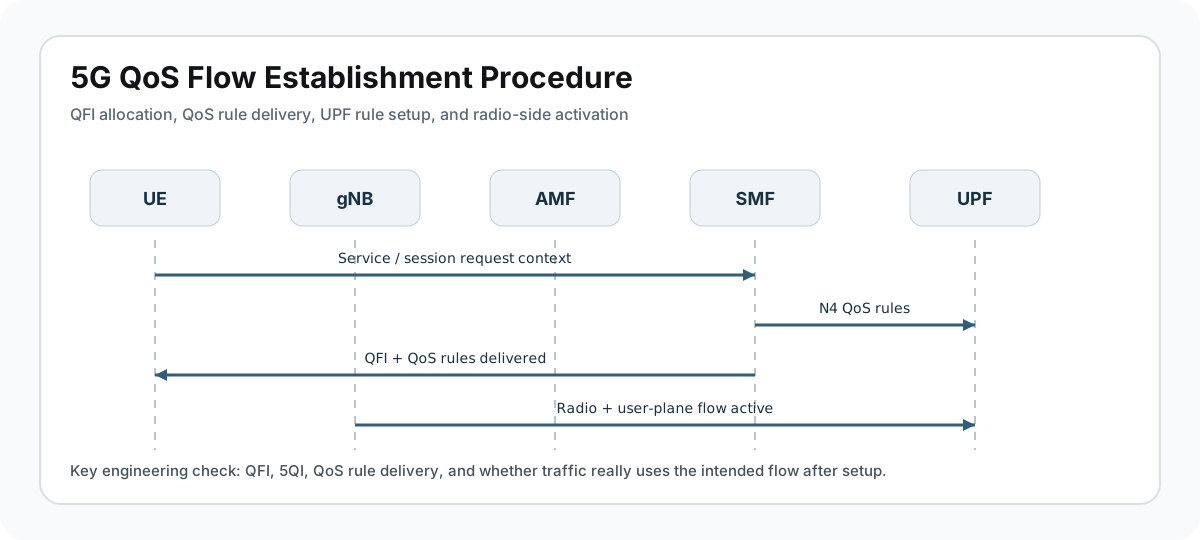
QoS Flow Establishment Call Flow Position
UE           gNB            AMF             SMF            UPF
 |            |              |               |              |
 |-- service / session req ->|               |              |
 |            |------------->|-------------->|              |
 |            |              |               |-- N4 rules ->|
 |            |              |               |<-- N4 ack ----|
 |<-- QoS rules / accept ----|<--------------|              |
 |==== Radio + user-plane mapping becomes active ==========>|
In most traces, QoS flow establishment appears as part of a broader PDU session procedure, but the important engineering evidence is the QFI allocation, QoS rules, and the resulting access-side resource setup.
Step-by-Step QoS Flow Establishment Procedure
Step 1: Service Need Triggers QoS Setup
The trigger can be initial session setup, network-triggered service activation, or a policy-driven need for a new QoS treatment.
What to inspect
- Whether this happens during initial PDU session setup or later as a change
- Service type and application requirement
- DNN and slice context
Step 2: SMF Creates QoS Flow Context
The SMF decides the QoS profile, allocates a QFI, and prepares the required policy and forwarding rules.
What to inspect
- QFI value
- 5QI
- ARP, GBR, MFBR, or non-GBR behavior where relevant
- PCF influence on policy outcome
Step 3: UPF and RAN Are Configured
The SMF configures the UPF, and the access side gets the information needed to map the QoS flow into radio resources and user-plane handling.
What to inspect
- N4 rule installation
- Whether the gNB received the expected QoS context
- Any mismatch between service-level and radio-level treatment
Step 4: UE Receives QoS Rules
The UE receives the rules that tell it how uplink traffic should be associated with the newly established QoS flow.
What to inspect
- QoS rules delivered to the UE
- QFI mapping in uplink and downlink
- Whether the expected application traffic can actually use the new flow
Step 5: Traffic Starts Using the Flow
Once the flow is active, application traffic should show the expected QoS behavior across the PDU session, UPF, and radio path.
What to inspect
- Observed throughput or delay
- Whether the correct QFI is used
- Whether packets fall back to the default flow unexpectedly
Common Failure Patterns
| Failure pattern | Typical engineering meaning |
|---|---|
| QoS flow never becomes active | SMF, UPF, or access-side configuration did not complete correctly. |
| Wrong QFI or missing rule mapping | Traffic is not being classified onto the intended flow. |
| Service works but with wrong performance | 5QI, GBR, ARP, or radio treatment does not match the service need. |
| Dedicated flow setup rejected | Policy, subscription, slice, or resource limits blocked the requested QoS treatment. |
What to Check in Logs and Traces
- QFI and 5QI values assigned by the network.
- QoS rules sent to the UE.
- N4 rule installation status on the UPF side.
- Whether the gNB received and applied the right QoS context.
- Whether the traffic actually uses the expected flow after setup.
Related Procedures
Recommended Reference Specifications
- 3GPP TS 23.501 - System Architecture for the 5G System
- 3GPP TS 23.502 - 5G System Procedures
- 3GPP TS 24.501 - NAS Protocol
- 3GPP TS 29.244 - PFCP / N4 Signaling
- 3GPP TS 38.300 - NR and NG-RAN Overall Description