5G RRC Connection Setup Procedure Explained
Introduction
In 5G networks, the RRC Connection Setup procedure is the process that establishes a Radio Resource Control (RRC) connection between the User Equipment (UE) and the gNB (5G base station).
This procedure moves the UE from RRC Idle state to RRC Connected state, enabling the device to exchange signaling and data with the network.
The RRC connection setup is required for several procedures such as:
- 5G registration
- PDU session establishment
- data transmission
- mobility management
The procedure is defined by the 3rd Generation Partnership Project in:
- 3GPP TS 38.331 - NR RRC Protocol
- 3GPP TS 38.300 - NR Architecture
Why RRC Connection Setup Is Needed
When the UE is in Idle Mode, it does not maintain an active connection with the base station.
Before any signaling or data transmission can occur, the UE must establish an RRC connection.
This procedure allows the network to:
- allocate radio resources
- configure signaling channels
- start NAS communication
Network Elements Involved
UE (User Equipment)
Initiates the connection setup procedure when it needs to communicate with the network.
gNB (Next Generation NodeB)
The 5G base station responsible for managing radio connections with UEs.
Interfaces Used
| Interface | Description |
|---|---|
| NR-Uu | Radio interface between UE and gNB |
| N1 | NAS signaling between UE and AMF (after connection setup) |
RRC Connection Setup Call Flow
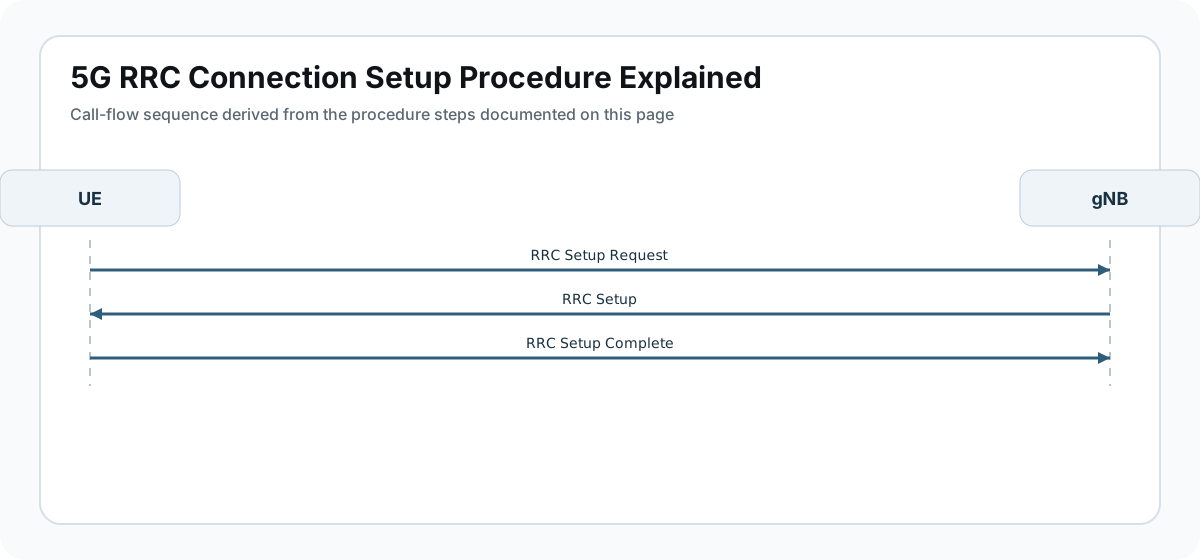
Below is the simplified signaling sequence.
UE                    gNB
 |                     |
 |---RRC Setup Request->|
 |                     |
 |<--RRC Setup---------|
 |                     |
 |---RRC Setup Complete->|
After this procedure, the UE enters RRC Connected state.
Step-by-Step Explanation
Step 1: RRC Setup Request
The UE sends an RRC Setup Request message to the gNB.
This message indicates that the UE wants to establish an RRC connection.
Common triggers include:
- UE registration procedure
- mobile terminated paging response
- data transmission request
Important parameters to check
Engineers should verify:
- establishment cause
- UE identity (random value or temporary identity)
- message integrity
Step 2: RRC Setup
The gNB allocates radio resources and responds with RRC Setup.
This message configures:
- signaling radio bearer (SRB)
- radio configuration parameters
- initial security settings
Important parameters to check
Check:
- radio bearer configuration
- physical layer parameters
- MAC configuration
Step 3: RRC Setup Complete
The UE sends RRC Setup Complete to confirm that the configuration has been applied.
This message may also contain NAS signaling messages, such as the Registration Request.
Important parameters to check
Verify:
- NAS message container
- UE identity information
- signaling integrity
Data Exchange After RRC Setup
Once the procedure completes, the UE enters RRC Connected mode.
The UE can now:
- send NAS signaling messages
- establish PDU sessions
- exchange user data
RRC States in 5G
| State | Description |
|---|---|
| RRC Idle | UE not actively connected to gNB |
| RRC Connected | UE maintains active connection |
| RRC Inactive | Intermediate state for faster reconnection |
Troubleshooting RRC Connection Setup
RRC Setup Failure
Possible causes:
- poor radio signal
- incorrect cell configuration
- access barring
Random Access Failure
Possible reasons:
- PRACH configuration issues
- synchronization errors
- uplink interference
RRC Connection Reject
Possible causes:
- network congestion
- access restrictions
- UE authentication issues
Key Messages in RRC Connection Setup
| Message | Purpose |
|---|---|
| RRC Setup Request | UE requests connection |
| RRC Setup | gNB configures radio resources |
| RRC Setup Complete | UE confirms setup |
Relevant 3GPP Specifications
The RRC Connection Setup procedure is defined by the 3rd Generation Partnership Project in:
- 3GPP TS 38.331 - NR RRC Protocol
- 3GPP TS 38.300 - NR Overall Description
Summary
The RRC Connection Setup procedure establishes the initial radio connection between the UE and the 5G base station.
The process includes:
- UE sending RRC Setup Request
- gNB allocating resources and sending RRC Setup
- UE confirming with RRC Setup Complete
After this step, the UE enters RRC Connected mode, allowing signaling and data exchange with the network.