5G Emergency Registration Procedure Explained
Introduction
The Emergency Registration procedure in 5G networks allows a User Equipment (UE) to access emergency services even when normal network registration is not available.
This procedure ensures that users can make emergency calls such as:
- 911
- 112
- other emergency service numbers
even if:
- the UE is not fully registered
- the subscriber does not have valid credentials
- the network does not allow normal services
The procedure is defined by the 3rd Generation Partnership Project in:
- TS 23.502 - 5G System Procedures
- TS 24.501 - NAS Protocol
When Emergency Registration Is Triggered
Emergency Registration occurs when:
- the UE attempts an emergency call
- the UE is not registered with the network
- the network rejects normal registration
Examples include:
- SIM not provisioned
- roaming restrictions
- subscription expired
- UE not authenticated
Despite these conditions, the network must still allow emergency access.
Network Elements Involved
UE (User Equipment)
The UE triggers emergency registration when the user initiates an emergency call.
gNB (5G Base Station)
Provides radio access and forwards emergency signaling to the core network.
AMF (Access and Mobility Management Function)
Handles emergency registration and allows limited service access.
IMS Emergency Services
Once registration succeeds, emergency calls are routed through the IMS emergency services architecture.
Interfaces Used
| Interface | Description |
|---|---|
| NR-Uu | Radio interface between UE and gNB |
| N1 | NAS signaling between UE and AMF |
| N2 | Control plane between gNB and AMF |
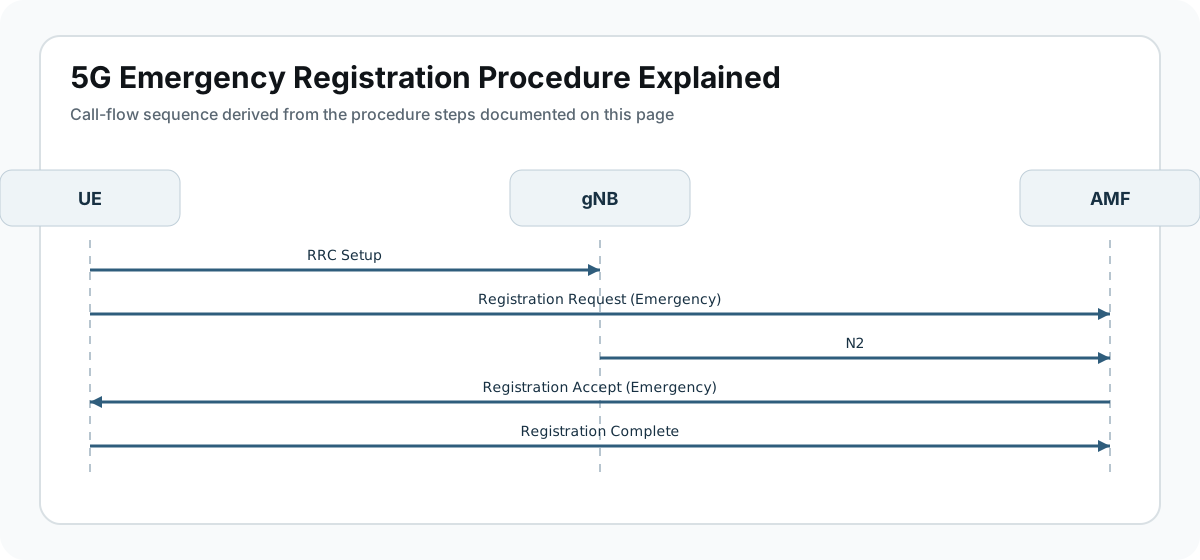
Emergency Registration Call Flow
Below is the simplified message sequence.
UE                gNB                AMF
 |                 |                  |
 |----RRC Setup--->|                  |
 |                 |                  |
 |---Registration Request (Emergency)-->|
 |                 |----N2----------->|
 |                 |                  |
 |<--Registration Accept (Emergency)--|
 |---Registration Complete----------->|
This procedure is simpler than normal registration because:
- authentication may be skipped
- limited service access is allowed
Step-by-Step Explanation
Step 1: Emergency Call Trigger
The UE detects that the user dialed an emergency number.
Examples include:
- 911
- 112
The UE then attempts Emergency Registration if it is not already registered.
Important parameters to check
Engineers should verify:
- emergency call indicator
- emergency service category
- emergency number detection
Step 2: RRC Connection Setup
The UE establishes a radio connection with the gNB.
Typical messages include:
- RRC Setup Request
- RRC Setup
- RRC Setup Complete
The establishment cause is usually set to:
emergencyImportant parameters to check
Look for:
- RRC establishment cause = emergency
- serving cell information
- radio signal quality
Step 3: Emergency Registration Request
The UE sends a Registration Request with the registration type set to emergency.
The message includes:
- UE identity (if available)
- emergency indicator
- UE capabilities
This message is forwarded to the AMF.
Important parameters to check
Check:
- registration type = emergency
- emergency indicator flag
- UE identity used
Step 4: Limited Network Authentication
In many cases, the network skips full authentication to allow emergency access quickly.
Instead, the network:
- validates the request
- allows limited registration
This ensures emergency services remain accessible.
Important parameters to check
Engineers should verify:
- emergency service authorization
- restricted service mode
- emergency service category
Step 5: Registration Accept
The AMF sends Registration Accept indicating emergency registration.
The UE now enters limited service mode.
This allows:
- emergency voice calls
- location reporting
but blocks normal services.
Important parameters to check
Check:
- registration result = emergency services
- allowed services list
- emergency indication flag
Step 6: Registration Complete
The UE sends Registration Complete to confirm the procedure.
After this step:
- emergency services are available
- the UE can initiate an emergency call
What Happens Next?
After emergency registration, the UE performs:
- Emergency PDU Session Establishment
- IMS Emergency Call Setup
This connects the call to public safety answering points (PSAP).
Differences Between Normal and Emergency Registration
| Feature | Normal Registration | Emergency Registration |
|---|---|---|
| Authentication | Required | May be skipped |
| Services Allowed | Full services | Emergency services only |
| Subscription Required | Yes | Not always |
| Access Type | Normal access | Limited emergency access |
Common Troubleshooting Scenarios
Emergency Registration Rejected
Possible causes:
- emergency access disabled
- network configuration error
- gNB configuration issue
UE Cannot Initiate Emergency Call
Possible causes:
- IMS emergency services not configured
- emergency PDU session failure
- location reporting failure
Registration Succeeds but Call Fails
Possible reasons:
- IMS emergency routing problem
- PSAP connectivity issue
Key Messages in Emergency Registration
| Message | Purpose |
|---|---|
| RRC Setup | Establish radio connection |
| Registration Request (Emergency) | UE requests emergency access |
| Registration Accept | Network allows emergency services |
| Registration Complete | UE confirms procedure |
Relevant 3GPP Specifications
This procedure is defined in:
- TS 23.502 - 5G System Procedures
- TS 24.501 - NAS Protocol
- TS 33.501 - 5G Security
Published by the 3rd Generation Partnership Project.
Summary
The Emergency Registration procedure ensures that users can always access emergency services in 5G networks, even when normal registration fails.
The network allows limited connectivity so that emergency calls can still be routed to the appropriate public safety services.
This is a critical feature of modern mobile networks that ensures public safety and regulatory compliance.